
Daily close and Z report
How to close the trading day cleanly, record variances properly and keep a usable audit trail.
Need support?
If a session total looks wrong, do not force a fake correction. Record what happened and contact support if needed.
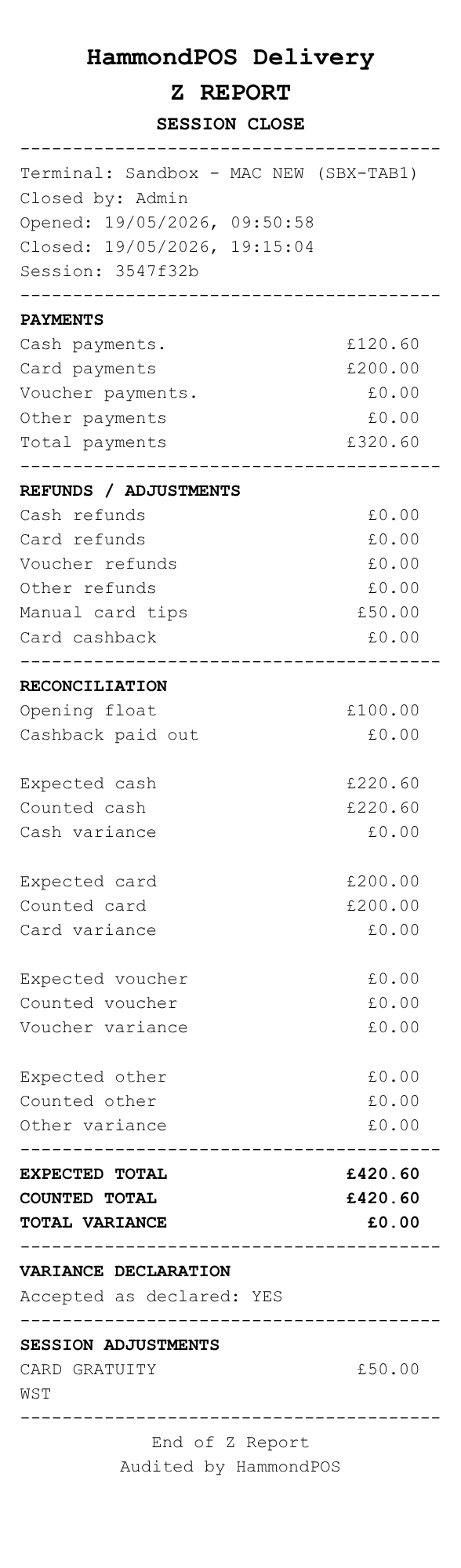
Example HammondPOS Z report printout.
Open session
Start the trading session with the opening float before taking live payments. If the terminal does not support cash handling, the opening cash float is fixed at £0.00 and the closing cash count must also be £0.00.
Close session
Enter counted cash, card, voucher and other totals, plus card gratuities and cashback where applicable.
If there is a variance, record the reason and note rather than forcing an artificial correction.
Z report
Close the session and print the Z report. Keep it with your normal daily reconciliation records.